Most of the Hindu scriptures talk of gods such as Hanuman of having learned the 64 arts. Have you ever wondered about what these arts are? Here is the actual list of the 64 divine arts that the great kings of India were well versed in. I managed to retrieve this data from a popular ancient treatise written by Vatsayana.
1.Singing
2.Playing on musical instruments
3.Dancing
4.Union of dancing, singing, and playing instrumental music
5.Writing and drawing
6.Tattooing
7.Arraying and adorning an idol with rice and flowers
8.Spreading and arranging beds or couches of flowers, or flowers upon the ground
9.Colouring the teeth, garments, hair, nails and bodies, i.e. staining, dyeing, colouring and painting the same
10.Fixing stained glass into a floor
11.The art of making beds, and spreading out carpets and cushions for reclining
12.Playing on musical glasses filled with water
13.Storing and accumulating water in aqueducts, cisterns and reservoirs
14.Picture making, trimming and decorating
15.Stringing of rosaries, necklaces, garlands and wreaths
16.Binding of turbans and chaplets, and making crests and top-knots of flowers
17.Scenic representations, stage playing Art of making ear ornaments Art of preparing perfumes and odours
18.Proper disposition of jewels and decorations, and adornment in dress
19.Magic or sorcery
20.Quickness of hand or manual skill
21.Culinary art, i.e. cooking and cookery
22.Making lemonades, sherbets, acidulated drinks, and spirituous extracts with proper flavour and colour
23.Tailor's work and sewing
24.Making parrots, flowers, tufts, tassels, bunches, bosses, knobs, etc., out of yarn or thread
25.Solution of riddles, enigmas, covert speeches, verbal puzzles and enigmatical questions
26.A game, which consisted in repeating verses, and as one person finished, another person had to commence at once, repeating another verse, beginning with the same letter with which the last speaker's verse ended, whoever failed to repeat was considered to have lost, and to be subject to pay a forfeit or stake of some kind
27.The art of mimicry or imitation
28.Reading, including chanting and intoning
29.Study of sentences difficult to pronounce. It is played as a game chiefly by women, and children and consists of a difficult sentence being given, and when repeated quickly, the words are often transposed or badly pronounced
30.Practice with sword, single stick, quarter staff and bow and arrow
31.Drawing inferences, reasoning or inferring
32.Carpentry, or the work of a carpenter
33.Architecture, or the art of building
34.Knowledge about gold and silver coins, and jewels and gems
35.Chemistry and mineralogy
36.Colouring jewels, gems and beads
37.Knowledge of mines and quarries
38.Gardening; knowledge of treating the diseases of trees and plants, of nourishing them, and determining their ages
39.Art of cock fighting, quail fighting and ram fighting
40.Art of teaching parrots and starlings to speak
41.Art of applying perfumed ointments to the body, and of dressing the hair with unguents and perfumes and braiding it
42.The art of understanding writing in cypher, and the writing of words in a peculiar way
43.The art of speaking by changing the forms of words. It is of various kinds. Some speak by changing the beginning and end of words, others by adding unnecessary letters between every syllable of a word, and so on
44.Knowledge of language and of the vernacular dialects
45.Art of making flower carriages
46.Art of framing mystical diagrams, of addressing spells and charms, and binding armlets
47.Mental exercises, such as completing stanzas or verses on receiving a part of them; or supplying one, two or three lines when the remaining lines are given indiscriminately from different verses, so as to make the whole an entire verse with regard to its meaning; or arranging the words of a verse written irregularly by separating the vowels from the consonants, or leaving them out altogether; or putting into verse or prose sentences represented by signs or symbols. There are many other such exercises.
48.Composing poems
49.Knowledge of dictionaries and vocabularies
50.Knowledge of ways of changing and disguising the appearance of persons
51.Knowledge of the art of changing the appearance of things, such as making cotton to appear as silk, coarse and common things to appear as fine and good
52.Various ways of gambling
53.Art of obtaining possession of the property of others by means of muntras or incantations
54.Skill in youthful sports
55.Knowledge of the rules of society, and of how to pay respect and compliments to others
56.Knowledge of the art of war, of arms, of armies, etc.
57.Knowledge of gymnastics
58.Art of knowing the character of a man from his features
59.Knowledge of scanning or constructing verses
60.Arithmetical recreations
61.Making artificial flowers
62.Making figures and images in clay
The other 2 arts are actually included in the above list. It is just that they haven't been mentioned explicitly.
Automatically turning on and off your computer is something that some of us desire. It is generally useful if you have to download something at a prescribed time interval.
You can automate your computer using a simple program called "Wake up on Stand By". This is a 200Kb program writte by a certain dennis babkin.
The program can be found here
The program is intuitive and easy to understand. It also has a Network repair feature that allows you to automatically repair the Network Connection.
Leave a comment if you need help using the program.
Category:
automatic,
kougon,
program,
software,
turn off,
turn on,
windows XP
0
comments


This article will teach you how to make the best use of your Broadband plans which offer unlimited Downloads at insane times of the day.
UPDATE:Also Read the article on an extremely simple method to automatically turn on and off your PC without any of the following fuss.
Some of the major Broadband providers (e.g BSNL in India) offer cheap plans wherein you have a data limited internet usage during the day but you get unlimited downloads during your sleeping hours (e.g 2.00 AM to 8.00 AM in case of BSNL in India). So, if you have to download stuff off the web you have to wake up at this time of the night and then lose sleep for an hour trying to figure out the links and then wake up again in 5hrs to switch off your internet connection.
The best way to use these plans would be to automate the whole process of switching on the PC. beginning the downloads and then turning it off by itself. I will show you exactly how to do this using resources available on a Windows XP PC and few free softwares.
1. How to Automatically turn on your PC at an assigned time
We will use the task schedulder of windows to automatically wake up your PC from 'Hibernation' or 'Stand-by' (You cannot turn-on your computer automatically after it is turned off) .
You will find the following screen:
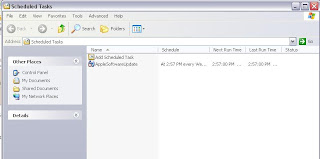
ii.Click on 'Add Scheduled Task'

iii.Choose the Torrent program or any other program that you wish to start at a predefined time.

iv. Choose a time when your have free usage of the web and click on next

v. For the task scheduler to work properly you must create a password for your user account. ( if you haven't yet created one, click here to guide you through the process)

 vi. Make sure you checked the 'open advanced properties tab'. This is critical to wake up your PC. (tip: you can also access the following screen by right clicking on a task under scheduled tasks and then clicking on properties)
Select the option 'Wake the computer to run this task'. This will automatically turn on your PC from hibernation or stand-by and then run the task. ( how to enable hibernation in Windows XP)

Click on 'apply' and 'OK', that's it ! your PC will now wake up by itself every night at 2:05A.m and will turn on utorrent. and utorrent will begin downloading stuff off the web without any intervention from you.
Kougon Tip: Since you can schedule any file to run by itself at a prescribed time. You can have our torrents begin by themselves. Save the torrent file onto your computer. And then make sure your Bit Torrent client will save data to a default location. Have the scheduler to run the torrent and lo! your torrents will begin to download by themselves without you having to put them inside a client!
2. How to turn-off your computer automatically
Even though this sounds like the harder task, it is actually quite easy to turn off your PC automatically. I prefer using a freeware called 'Shutdown After' to do the same.
The software is a 3.2MB download and is worth every byte of it.
Click here to download Shutdown After v2.2
The software is self explanatory in nature and has very few options. You can either set your computer to turn off after a prescribed amount of time has elapsed or at a particular time.
Set the time at which you want your PC to sleep, Hibernate, stand-by, Shut down or even Restart! and it will happen.
Using these two tricks you can have your PC waking up and shutting down all-by-itself without you having to intervene at all!!!
UPDATE 1: Some people have reported that their internet connection does not resume automatically when their PC's come out of standby. Here is a work-around for this problem.
In-order to address this problem what you need is a software to automatically configure your internet connection. One of the best softwares out there is Toshiba's ConfigFree. Using a small hack you can use this software on any computer.
The following lines were taken from a forum of PC WORLD.
" For those of us that dont have Toshiba laptops it can be made to run on other Laptop Manufacture Models too.
DOWNLOAD ConfigFree from
http://askiris.toshiba.com/ToshibaSupportSite/search.do?cmd=displayKC&docType=kc&externalId=1474464xml&sliceId=&dialogID=7075587&stateId=0%200%207077243
OR
direct download: http://cdgenp01.csd.toshiba.com/content/support/downloads/util_configfree_24997B.exe
look for: util_configfree_24997B.exe
Title: Config Free for Windows XP
Version: 5.90.07
Size: 14,945,416 bytes
Posted: 08/23/06
Released Date: 08/22/06
Operating System: Windows XP, Windows XP SP2
INSTRUCTIONS:
1-Install it program and reboot.
2-Then open regedit.
Under HKEY_LOCAL_MACHINE->SOFTWARE->TOSHIBA>CONFIGFREE
Locate the "Instcheck" line on the right side of the screen.
Set VALUE to "Satellite 5205"
3-Reboot.
4- After reboot go = Start the program from the start button, it is in the All Programs\Toshiba\Networking menu. (ENJOY)
PS: The fix instructions was from: http://forums.wi-fiplanet.com/archive/index.php/t-5218.html
Help Link to option Configfree http://209.167.114.38/support/techsupport/troubleshooting/Configfree/CF2/cf2_5.htm
http://www.compu-link.com.au/configfree.htm
Toshiba Help Link http://eu.computers.toshiba-europe.com/cgi-bin/ToshibaCSG/solution_content_article.jsp?z=126&service=EU&SOLUTION_ID=ConfigFree_QandA "
Configfree will run every time you turn on your PC and will automatically configure the web for you.You will not be without the web whenever you recover from standby or even after a shutdown.
UPDATE:Also Read the article on an extremely simple method to automatically turn on and off your PC without any of the following fuss.
Some of the major Broadband providers (e.g BSNL in India) offer cheap plans wherein you have a data limited internet usage during the day but you get unlimited downloads during your sleeping hours (e.g 2.00 AM to 8.00 AM in case of BSNL in India). So, if you have to download stuff off the web you have to wake up at this time of the night and then lose sleep for an hour trying to figure out the links and then wake up again in 5hrs to switch off your internet connection.
The best way to use these plans would be to automate the whole process of switching on the PC. beginning the downloads and then turning it off by itself. I will show you exactly how to do this using resources available on a Windows XP PC and few free softwares.
1. How to Automatically turn on your PC at an assigned time
We will use the task schedulder of windows to automatically wake up your PC from 'Hibernation' or 'Stand-by' (You cannot turn-on your computer automatically after it is turned off) .
First begin the task scheduler. This is done as follows. Click on 'Windows Key'
i.Go to 'All programs' --> Accesories-->System tools-->Scheduled tasks
You will find the following screen:

ii.Click on 'Add Scheduled Task'

iii.Choose the Torrent program or any other program that you wish to start at a predefined time.

iv. Choose a time when your have free usage of the web and click on next

v. For the task scheduler to work properly you must create a password for your user account. ( if you haven't yet created one, click here to guide you through the process)

 vi. Make sure you checked the 'open advanced properties tab'. This is critical to wake up your PC. (tip: you can also access the following screen by right clicking on a task under scheduled tasks and then clicking on properties)
Select the option 'Wake the computer to run this task'. This will automatically turn on your PC from hibernation or stand-by and then run the task. ( how to enable hibernation in Windows XP)

Click on 'apply' and 'OK', that's it ! your PC will now wake up by itself every night at 2:05A.m and will turn on utorrent. and utorrent will begin downloading stuff off the web without any intervention from you.
Kougon Tip: Since you can schedule any file to run by itself at a prescribed time. You can have our torrents begin by themselves. Save the torrent file onto your computer. And then make sure your Bit Torrent client will save data to a default location. Have the scheduler to run the torrent and lo! your torrents will begin to download by themselves without you having to put them inside a client!
2. How to turn-off your computer automatically
Even though this sounds like the harder task, it is actually quite easy to turn off your PC automatically. I prefer using a freeware called 'Shutdown After' to do the same.
The software is a 3.2MB download and is worth every byte of it.
Click here to download Shutdown After v2.2
The software is self explanatory in nature and has very few options. You can either set your computer to turn off after a prescribed amount of time has elapsed or at a particular time.
Set the time at which you want your PC to sleep, Hibernate, stand-by, Shut down or even Restart! and it will happen.
Using these two tricks you can have your PC waking up and shutting down all-by-itself without you having to intervene at all!!!
UPDATE 1: Some people have reported that their internet connection does not resume automatically when their PC's come out of standby. Here is a work-around for this problem.
In-order to address this problem what you need is a software to automatically configure your internet connection. One of the best softwares out there is Toshiba's ConfigFree. Using a small hack you can use this software on any computer.
The following lines were taken from a forum of PC WORLD.
" For those of us that dont have Toshiba laptops it can be made to run on other Laptop Manufacture Models too.
DOWNLOAD ConfigFree from
http://askiris.toshiba.com/ToshibaSupportSite/search.do?cmd=displayKC&docType=kc&externalId=1474464xml&sliceId=&dialogID=7075587&stateId=0%200%207077243
OR
direct download: http://cdgenp01.csd.toshiba.com/content/support/downloads/util_configfree_24997B.exe
look for: util_configfree_24997B.exe
Title: Config Free for Windows XP
Version: 5.90.07
Size: 14,945,416 bytes
Posted: 08/23/06
Released Date: 08/22/06
Operating System: Windows XP, Windows XP SP2
INSTRUCTIONS:
1-Install it program and reboot.
2-Then open regedit.
Under HKEY_LOCAL_MACHINE->SOFTWARE->TOSHIBA>CONFIGFREE
Locate the "Instcheck" line on the right side of the screen.
Set VALUE to "Satellite 5205"
3-Reboot.
4- After reboot go = Start the program from the start button, it is in the All Programs\Toshiba\Networking menu. (ENJOY)
PS: The fix instructions was from: http://forums.wi-fiplanet.com/archive/index.php/t-5218.html
Help Link to option Configfree http://209.167.114.38/support/techsupport/troubleshooting/Configfree/CF2/cf2_5.htm
http://www.compu-link.com.au/configfree.htm
Toshiba Help Link http://eu.computers.toshiba-europe.com/cgi-bin/ToshibaCSG/solution_content_article.jsp?z=126&service=EU&SOLUTION_ID=ConfigFree_QandA
Configfree will run every time you turn on your PC and will automatically configure the web for you.You will not be without the web whenever you recover from standby or even after a shutdown.
Category:
automatic,
best use,
broadband,
bsnl,
combo plan,
config free,
configure web automatically,
night unlimited,
shutdown-after,
toshiba,
turn off,
turn on,
windows task scheduler
1 comments
Subscribe to:
Posts (Atom)
